The Brick Review: A Physical Solution to Digital Distraction and Smarter Phone Use
 Giulia Eleonora
—
Giulia Eleonora
—
Smartphones have become indispensable tools for communication, navigation, learning, entertainment, and work. Yet the same device that connects us to opportunity can also fragment attention, interrupt deep work, and quietly consume hours of our day. Notifications, algorithm-driven feeds, short-form video loops, and constant messaging create a behavioral cycle that is difficult to interrupt. Many people recognize the need to reduce screen time, but traditional software controls often fail because they are too easy to override.
Digital wellbeing is no longer just a trend; it is a necessity for productivity, mental clarity, and balanced living. Focus has become one of the most valuable modern skills. In response to this growing challenge, The Brick introduces a refreshingly simple yet powerful idea: adding physical intention to digital boundaries. Instead of relying only on settings hidden inside your phone, The Brick creates a tangible interaction that makes distraction control more deliberate.
This in-depth review explores how The Brick works, why physical friction matters in habit change, who benefits most from using it, and how it fits into a broader digital minimalism strategy.
What Is The Brick?
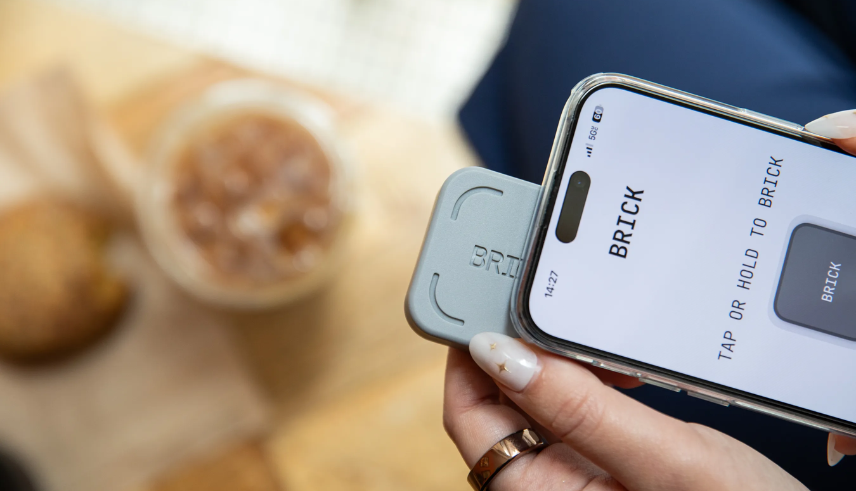
The Brick is a small physical device that pairs with a mobile app to block selected apps and notifications on your phone. Its defining feature is that it requires a physical tap interaction to activate or deactivate blocking mode. That extra step is the core innovation: it introduces intentional friction between you and your most distracting apps.
Users begin by downloading the companion app and selecting which apps they want blocked during focus mode. This might include social media platforms, video streaming apps, games, or any other source of habitual distraction. Once configured, activating focus mode requires physically tapping your phone to The Brick device. When you do so, the chosen apps are blocked according to your preset rules.
To regain access, you must physically tap your phone on The Brick again. This design ensures that exiting focus mode is not an impulsive tap on a screen, but a conscious action requiring movement and intention.

Why Physical Friction Changes Behavior
Behavioral psychology suggests that habits thrive on low-friction loops. When an action is easy and instant, it becomes automatic. Smartphones are engineered around this principle—unlock, swipe, scroll, repeat. The ease of access fuels compulsive checking.
The Brick disrupts this loop by adding friction. If the device is placed across the room, in another office space, or even in a drawer, accessing blocked apps requires effort. That extra effort creates a pause, and in that pause lies awareness. Often, the simple act of needing to stand up and walk to the device is enough to prevent impulsive scrolling.
This concept mirrors techniques used in productivity design: placing junk food out of reach reduces consumption; disabling autoplay reduces binge watching. The Brick applies the same logic to smartphone behavior.
Structured Focus for Work and Study
One of the most common uses for The Brick is structured work sessions. Professionals working in open offices or remote environments often struggle with constant interruptions from messaging apps and social media alerts. Even short glances at notifications can derail concentration for several minutes.
By activating focus mode before beginning a work block, users create a protected time window. During this period, distracting apps remain inaccessible, allowing deeper engagement with tasks. Over time, this can improve productivity, reduce procrastination, and enhance work quality.
Students preparing for exams or completing assignments also benefit from distraction-free study sessions. Instead of relying on willpower alone, they can use The Brick as an external accountability tool that reinforces commitment.
Digital Boundaries for Personal Life
The Brick is not limited to professional productivity. Many users implement it during family dinners, social gatherings, or relaxation time. Phones often intrude into moments meant for connection. By activating a personal-time focus mode, individuals can be more present with loved ones.
Some users also apply it to evening routines. Blocking social media and streaming apps at night can reduce late-night scrolling and encourage healthier sleep patterns. Improved sleep hygiene is frequently associated with reduced screen exposure before bed.
Digital Minimalism and Habit Reset
The Brick aligns with principles of digital minimalism, a philosophy centered on intentional technology use. Instead of rejecting smartphones entirely, digital minimalists aim to use devices as tools rather than default entertainment machines.
For individuals attempting a digital detox, The Brick offers a middle ground. It does not require deleting apps permanently, but it creates structured boundaries around their use. This balanced approach can be more sustainable than extreme restrictions.
Over time, many users report that they need The Brick less frequently because healthier habits become ingrained. The device acts as training wheels for attention discipline.
Psychological Benefits of Reduced Distraction
Excessive app use is often linked to fragmented attention and heightened stress from constant notifications. By reducing impulsive phone checking, users may experience improved mental clarity and reduced cognitive overload.
When attention is reclaimed, tasks feel less overwhelming. Conversations become more engaging. Leisure activities feel more restorative. The Brick supports these shifts by making digital engagement a choice rather than a reflex.
Additionally, knowing that apps are blocked can reduce anxiety about missing out. If notifications are silenced intentionally, users can relax into their focus period without wondering what they are missing.
Custom Modes for Different Parts of the Day
The Brick app allows users to create customized blocking configurations. A Work mode might block social apps but allow messaging platforms. A Deep Focus mode might block nearly everything except essential tools. A Night mode could disable entertainment apps after a certain hour.
This flexibility allows the device to adapt to varied lifestyles. Entrepreneurs, students, creatives, and parents can tailor settings to align with their daily rhythms.
Who Benefits Most from The Brick?
The Brick is particularly helpful for professionals who struggle with constant digital interruptions, students who want to improve concentration, parents who want structured screen boundaries, and anyone attempting to reduce compulsive scrolling.
It is also valuable for individuals who have tried built-in screen time limits but found them too easy to bypass. Because The Brick introduces physical accountability, it strengthens commitment to focus.
Practical Considerations
The device is compact and portable, allowing placement in strategic locations such as work desks, kitchen counters, or bedside tables. Some users choose to keep it in a separate room to increase friction further.
Unlike subscription-based productivity apps, The Brick focuses on hardware-enabled control rather than recurring software fees. Its simplicity is part of its appeal.
Conclusion
The Brick offers a refreshingly tangible approach to digital wellbeing. In a world saturated with frictionless distractions, it introduces purposeful resistance. By requiring physical intention to access blocked apps, it helps transform reactive habits into conscious decisions.
For individuals seeking improved productivity, healthier phone boundaries, and more intentional screen use, The Brick serves as a practical and psychologically grounded tool. It does not eliminate technology—it repositions it as something to engage with deliberately.
Call to Action!
If you are ready to take control of your screen time, improve focus, and build healthier digital habits, explore The Brick and discover how adding physical intention to your phone routine can transform the way you work, connect, and live.
Latest Blogs


Top Categories
Most Reading Posts




More Blogs
-
 Health & Beauty March 30, 26